The magic of SSH Remote Forwarding
These past days I’ve been setting up a Raspberry Pi running some services in my room. I wanted to access them from outside the house’s network but unfortunately, I don’t have access to the router.
I could have set up a VPN client into the Pi but it is running a very minimal OS to which I cannot install packages.
Fortunately, SSH has an option for Remote port forwarding which allowed me to solve this problem.
Local port forwarding⌗
SSH Local port forwarding allows us to redirect queries from localhost:sourcePort to remotehost:onPort. It is specified in the following way:
ssh -L [bind_address:]sourcePort:remotehost:onPort gateway
gateway: The SSH connection will be open to that machineremotehost:onPort:gatewaywill connect toremotehost:onPortsourcePort: SSH will redirect our requests tosourcePorttoremotehost:onPortthroughgatewaybind_address: It may be used to bind the connection to a specific address. For example, localhost indicates that the listening port be bound for local use only
Remote port forwarding⌗
SSH Remote port forwarding allows us to forward all connection attempts to sourcePort to remotehost:onPort through gateway.
ssh -R [bind_address:]sourcePort:remotehost:onPort gateway
The parameters behave the same as in Local port forwarding.
There is an excellent answer in Stackoverflow [2] where the difference between local and remote port forwarding are explained.
My setup⌗
For my particular use case, the remote Raspberry Pi (RASPBERRY PI BEHIND ROUTER) executes the following loop after booting up:
while true; do
ssh -N -o ServerAliveInterval=10 -R 2222:localhost:22 pi@RASPBERRY_PI_OPEN
done &
As you may know by now, this SSH command opens a connection to my Raspberry Pi with some ports open globally (RASPBERRY PI OPEN). The SSH command is wrapped with a while true to start a new session if it dies.
Now, from RASPBERRY PI OPEN I can open an SSH connection to RASPBERRY PI BEHIND ROUTER using the following command:
ssh -l user -p 2222 localhost -L 8000:localhost:80
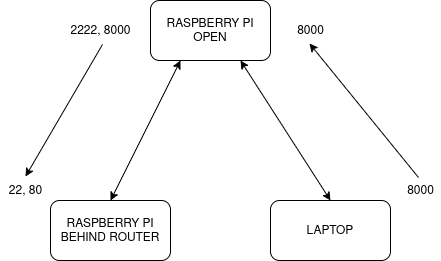
Besides, I redirect with Local port forwarding the port 80 of RASPBERRY PI BEHIND ROUTER to port 8000 of RASPBERRY PI OPEN so I can access a service running on that port.
The only remaining thing is connecting from my LAPTOP. For this, I also use Local port forwarding to redirect port 8000.
ssh RASPBERRY_PI_OPEN -L 8000:localhost:8000